Credit Card Payment
Merchants with an online website (online mall, ticketing site, top-up site, etc.) can integrate the credit card payment product described in this section.
Credit card payment is one of the payment methods of the PayCloud hosted checkout: the merchant specifies credit card payment when placing the order, the user selects credit card payment on the merchant page, the browser redirects to the PayCloud online checkout, and the cardholder enters the card details there to complete the payment.
After the user completes the payment, the merchant receives the PayCloud payment notification, and the merchant can also call the order query API to get the payment result. Once the payment result is obtained, PayCloud synchronizes and updates the order information to the merchant to complete the delivery of the remaining goods and services.
Supported card schemes: JCB, VISA, Mastercard, American Express, Diners, Discover, etc.
Supported transaction types: Consumption, Cancellation, Refund, Pre-authorization, etc.
| Terminal Type | Scenario | Description |
|---|---|---|
WEB | PC Web Payment | The merchant website is opened in a PC browser and redirects to the checkout |
WAP | Mobile Web Payment | The merchant website is opened in a mobile browser and redirects to the checkout, os_type is required |
Integration Notes
- You do not need to build your own card entry page. Card number, expiry date and security code are entered inside the PayCloud checkout only, so the merchant system never touches sensitive card data, which helps reduce the merchant's PCI DSS compliance burden.
- Pass
CreditLinkPayaspay_method_id. Do not pass a card brand (Visa/MasterCard/JCB, etc.) as the payment method, the card brand actually used is identified by the checkout from the card number (BIN). - 3D Secure (3DS) authentication is handled by the checkout automatically, no extra development is required; when the issuer requires cardholder verification, the checkout guides the user through the verification before continuing.
- After the payment is completed, the merchant receives the PayCloud payment notification, and can also call the order query API to obtain the payment result.
- Please make sure the corresponding product permission has been enabled before calling this API.
Credit card payment does not currently support sub_pay_method_id. If you need scheme-specific campaigns or instalments, contact your account manager first for evaluation.
Interaction Details
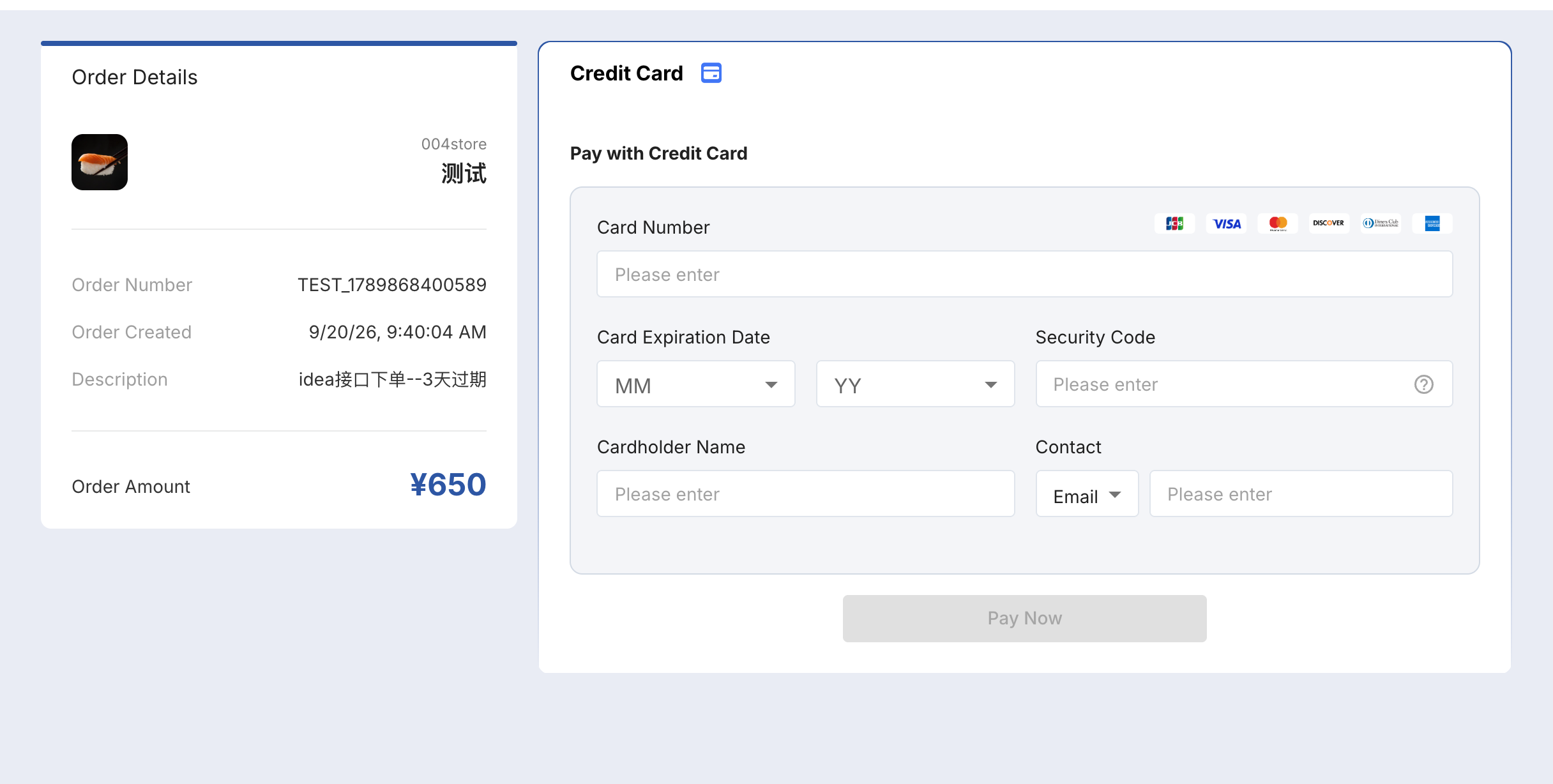
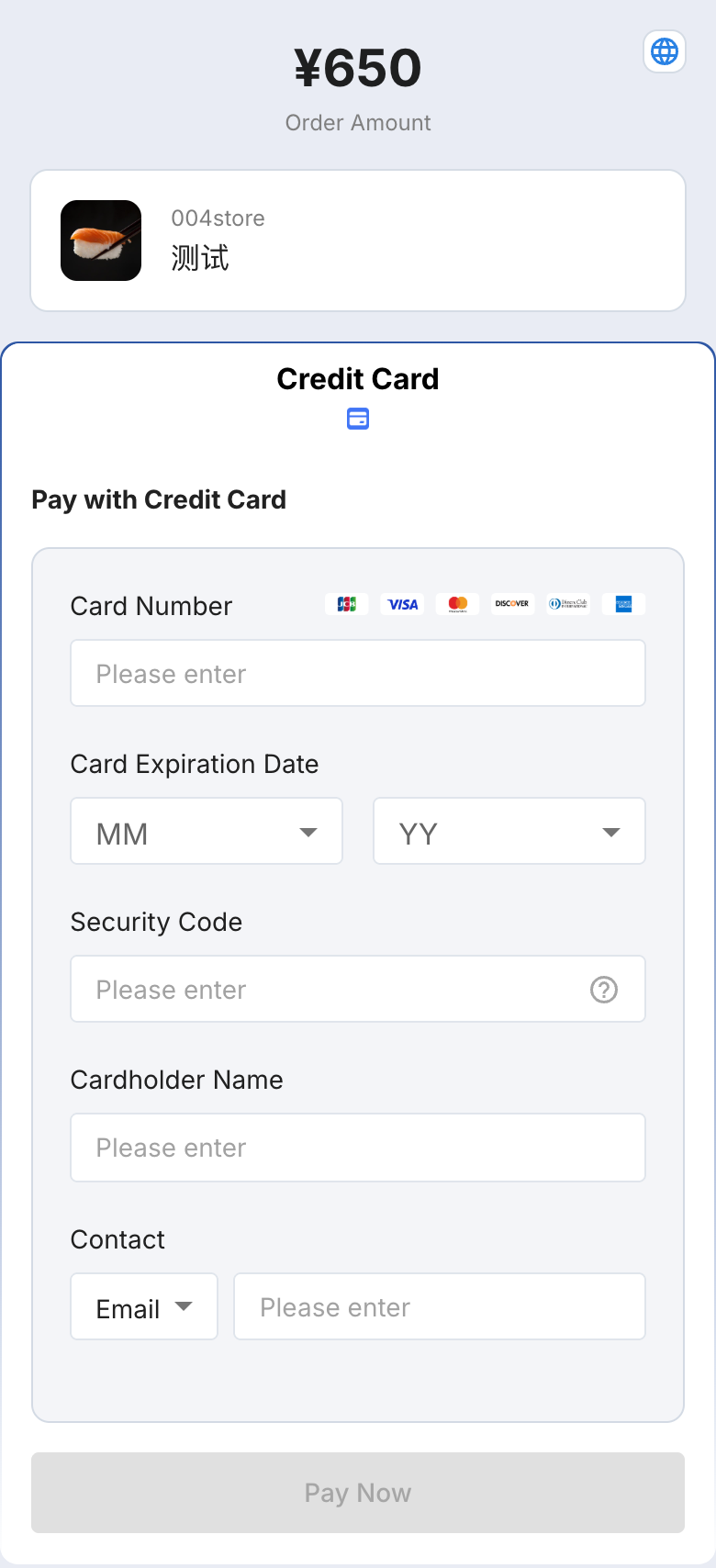
Checkout Page Preview
Payment Flow
Step 1: The user selects the goods on the merchant website, places the order, and chooses "Credit Card" as the payment method. The merchant server calls the Online PC/Mobile Web Payment API (pay_method_id = CreditLinkPay, terminal_type = WEB/WAP) and gets the checkout URL.
Step 2: The merchant page redirects to (or opens in a new window) the PayCloud online checkout. The left panel shows the Order Details: merchant/store, order number, order created time, description, order amount; the right panel is the credit card payment form.
Step 3: The cardholder enters the card details: Card Number (while typing, the checkout identifies the card scheme from the BIN and highlights the matching icon), Card Expiration Date (month/year drop-down), Security Code (CVV/CVC, with a help tooltip), Cardholder Name.
Step 4: The cardholder clicks "Pay Now". If the issuer requests 3D Secure authentication, the checkout redirects to the issuer authentication page (SMS OTP / app confirmation), and returns automatically after the verification.
Step 5: After the payment is completed, the checkout shows the payment result; if return_url was provided, the user is redirected back to the merchant page, based on which the merchant can display a customized order result.
Step 6: PayCloud sends an asynchronous payment result notification to the merchant server (notify_url), which serves as the final basis for settlement.
Payment Result (two channels)
- Asynchronous notification: after the transaction is completed, PayCloud sends the Transaction Result Notification to
notify_url, the merchant verifies the signature, updates the order status and returns the agreed response. - Active query: when no notification is received, the notification is delayed, or the user closed the page midway, call the Query Payment Order API to confirm the final status.
Do not rely on the synchronous redirect (return_url) as proof of a successful payment, it can be lost if the cardholder closes the browser midway.
Development Guide
API List
We provide a set of REST APIs, please refer to the table below. SDKs for several languages are available, please visit the SDK section.
| API Name | Description |
|---|---|
| Online PC/Mobile Web Payment | Place a payment order, specify pay_method_id = CreditLinkPay |
| Cancel Order | Close an unpaid order, or refund the user if it is already paid |
| Submit Order Refund | If the refund does not arrive immediately after submission, call the refund query API to get the progress |
| Query Payment Order | Query the result of a forward transaction (consumption / pre-authorization / pre-authorization completion) |
| Query Refund Order | Query the result of a refund transaction (cancellation / refund, etc.) |
| Transaction Result Notification | After the transaction is completed, notify the merchant of the transaction result |
Key Request Parameters (credit-card related)
For the complete parameter definitions, please refer to the place order API documentation. The parameters directly related to credit card payment are as follows:
| Parameter | Required | Value / Description |
|---|---|---|
pay_method_id | Yes | Fixed value CreditLinkPay, do not pass a card brand |
terminal_type | Yes | WEB = PC checkout, WAP = mobile checkout |
os_type | Required for WAP | ANDROID / IOS |
merchant_order_no | Yes | Merchant order number, unique per merchant |
price_currency | Yes | ISO-4217 currency code, for example JPY, CNY |
order_amount | Yes | Order amount, JPY has no decimal places and only accepts positive integers |
expires | Yes | Payment validity period in seconds, no more than 12 hours |
description | Yes | Product description, shown in the checkout "Description" field |
notify_url | Recommended | Asynchronous payment result notification URL |
return_url | Recommended | Page the user returns to after the payment |
language | Recommended | Checkout display language: ja-JP / en-US / zh-CN |
term_ip / longitude / latitude | Recommended | Risk control parameters, optional today, recommended to pass in advance for future risk-control requirements |
Notes
- Payment method value: always use
CreditLinkPay. The card brand is identified by the checkout from the BIN, there is no need (and it is wrong) to split the order entry by card brand. - Validity period:
expiresis the payment order validity period (not the business order validity period), unpaid orders are closed when it expires; set it together with your stock-holding strategy. - Amount format: JPY only accepts positive integer amounts, decimals cause order failures or amount errors.
- Result handling: confirm the payment result with both the asynchronous notification and the active query; verify the signature and make the processing idempotent.
- Refund and void: same-day transactions can be voided with the cancel order API, later or partial refunds use the refund API, the time to reach the card depends on the issuer (usually 1~10 business days).
- Security and compliance: the merchant system must not store or transmit card number, expiry date or security code, all sensitive data is collected by the PayCloud checkout.